

-
Getting Started
-
Dynamic Number Insertion
-
Agency
-
Number Management
- How to Purchase a Phone Number
- Set Receiving Number
- Set Recording
- Set Pre-amble / Caller Greeting
- How to Enable the Whisper Feature
- Set Voicemail
- Setting Caller Name and Track ID
- How to Create a Robo Call Filter
- After Hours Call Forwarding
- Phone Call Routing During Holidays
- How to Add a Sub Account in an AvidTrak Starter or Professional Account
- How To Block Nuisance Callers in AvidTrak
- How to Set Up Holiday Call Forwarding in AvidTrak
- How to Set Up Basic After Hours Call Forwarding in AvidTrak
-
Integrations
-
Account Management
-
Billing & Payments
-
Transcriptions
-
Reporting
-
Alerts
-
Leena AI Voice Agent
- Subscribe to Leena – AvidTrak’s AI Voice Agent
- Leena Smart Setup – Quick Onboarding
- Leena Start Here Preamble
- 1A – Create Your Leena AI Voice Agent Profile
- 1B – Configure Business Services and Information
- 2A – Configure Leena’s Greeting and Voice
- 2B – Configure Leena’s Call Instructions and Caller Information
- 3A – Configure Leena’s Call Handling and Follow-Up
- 3B – Connect a Calendar to Your Leena AI Voice Agent
- Leena 4 Review Test and Publish
-
AI Solutions Suite
-
Leads
View Payment History and Download Payment Receipts
1. In this tutorial you will learn how to review your payments to AvidTrak and obtain payment receipts for any given period.
2. To get started login to your AvidTrak account and from the left menu select the Payment History link under the Billing section.

3. Click the “Payment History” link

4. In the Payment History page, you will see the payments that you have made to AvidTrak for a given period. To adjust the period, simply change the date range in the upper right corner.
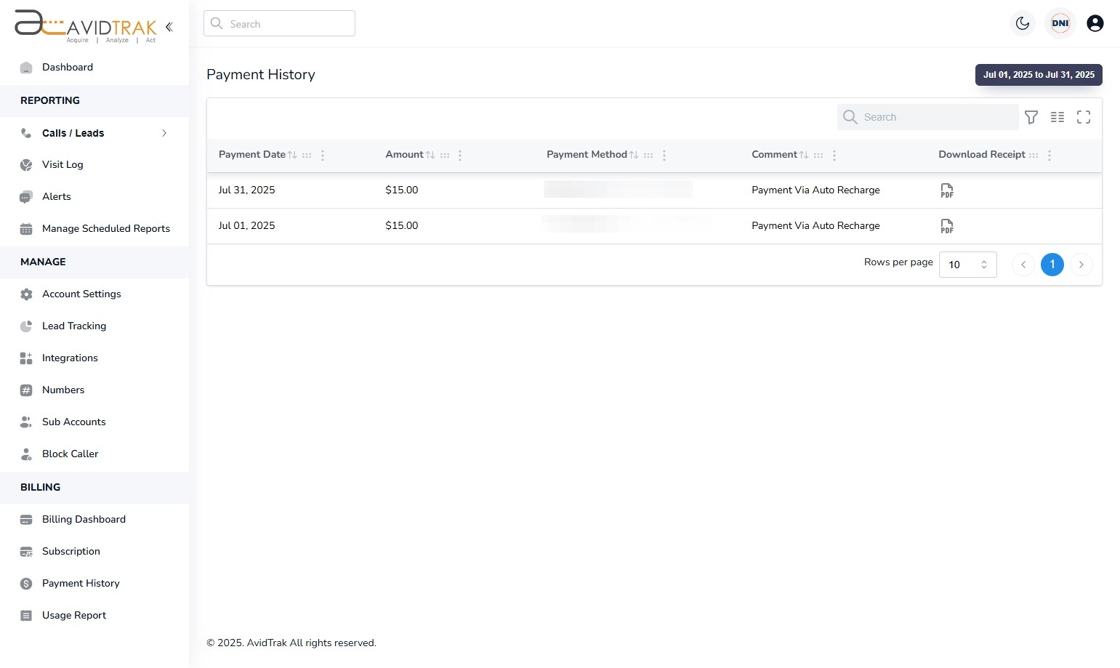
5. Click the Download Receipt icon to obtain a PDF copy of the payment receipt.

6. This completes the tutorial on how to access and view payments and download payment receipts. If you face any difficulty in implementing these instructions or have questions related to this feature, please do not hesitate to email support@avidtrak.com

