Advertising Call Tracking That Turns Display Clicks Into Measurable Call Conversions

Track every phone call back to the exact ad group, keyword, or placement and know which campaigns are worth your budget.

AvidTrak’s advertising call tracking connects phone calls to your display ads by assigning a unique tracking number to each campaign, publisher, and creative. After a click, Dynamic Number Insertion shows the correct phone number so you can see the exact call source, ad groups, call ads, and placements driving call conversions.

You can send every conversion event into Google Analytics, Google Ads, and your CRM data systems such as Salesforce, HubSpot, and Zoho.

14 days free trial

No credit card required

No white-label setup fees

Everything You Need for Reliable
Display Ads Call Tracking

Dynamic Number7

Dynamic Number Insertion

Assign a tracking number after each ad click to link display ads, ad groups, and placements to incoming phone calls.

Per-Placement Numbers

Per-Placement Numbers

Use unique phone numbers for each banner, video, or slot to compare call volume and call conversions across creatives.

Outcome Extraction

Referral Source Tracking

Track which websites, publishers, and content placements trigger phone calls and send the call source into your reporting tools.

Call Reporting

Granular Call Reporting

View campaign, publisher, creative, and placement data with call details such as call duration, call ads used, and call outcomes.
GA4 & Ads Sync

GA4 & Looker Sync

Send conversion events, call extensions, call-only ads, and website call conversion tracking into GA4 and Looker Studio.
RM Integration

CRM Connections

Send call conversions, call source, and caller details into Salesforce, HubSpot, or Zoho for better customer relationship management.

API & Partner

API & Partner Mapping

Connect affiliate tracking numbers or use the REST API to push digital advertising call tracking data into your dashboards.

How AvidTrak Follows the User From Click to Call

01

Assign Numbers

Assign a unique tracking number for each creative, publisher, or placement to measure phone calls from every display ad.

02

Render Numbers

AvidTrak renders the correct phone number on banners, video ads, or landing pages to identify the exact call source.

03

Use DNI After Click

Use DNI after each ad click to match the number, test variations, and capture website call conversion tracking in your advertising call tracking setup.

04

Report and Sync

Send campaign, publisher, creative, and placement data into GA4, Looker Studio, and CRM platforms such as Salesforce or HubSpot.

EMAIL MARKETING

Get the Advanced Call Tracking You Need to Improve Display Performance

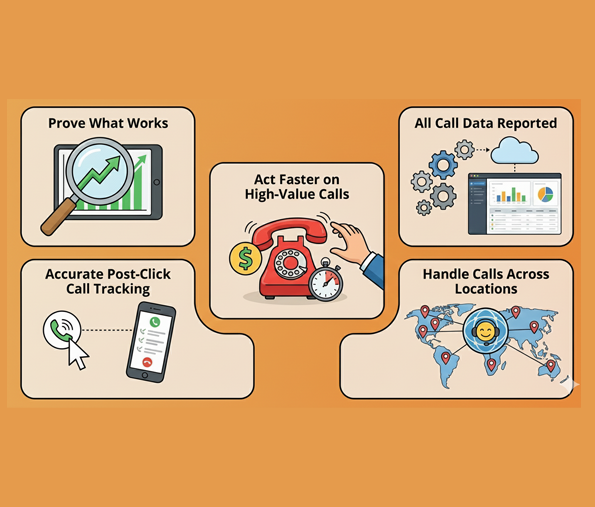
  • Prove What Works: Attribute phone calls to each campaign, publisher, creative, and placement using AvidTrak’s advertising call tracking, so you can see which display ads drive real call conversions.
  • Accurate Post-Click Call Tracking: Tie every post-click phone call to the right ad using DNI, so display campaigns, ad groups, and placements are measured without confusion.
  • Act Faster on High-Value Calls: Use AI-powered transcription and AI-powered conversation outcome extraction to flag bookings, pricing requests, or support needs, helping teams respond sooner and lift conversion rate from display-driven calls.
  • All Call Data Reported: Send call conversions, call source, call duration, and customer behavior to GA4, Looker Studio, and CRMs such as Salesforce, HubSpot, and Zoho for cleaner marketing analytics.
  • Handle Calls Across Locations: Support multi-location teams with routing based on time-of-day, sequential or simultaneous logic, or ZIP-code routing, keeping callers connected without losing potential leads.

Used by Agencies, Brands, and Multi-Location Teams

Apollidon
A-1 Concrete Leveling
Smooth Digital
Morbiz
MissQuito
Critter Control
New Horizons
Supply Post
Trutech Wildlife Service
Wabash
Think Integrated
INTEGRATE CALL DATA

AI Tools That Explain Your Call Outcomes

  • Use AI-powered transcription to turn call recordings into searchable text, helping teams review display-driven phone calls faster.
  • Rely on AI-powered conversation outcome extraction to flag bookings, pricing requests, or support needs tied to display ads.
  • Check caller sentiment for simple QA and coaching, keeping follow-ups consistent across all advertising call tracking campaigns.

Easy Integrations

Google Ads

Google Ads

Microsoft Advertising

Microsoft Advertising

Google Marketing Platform

Google Marketing Platform

Google Analytics 4

Google Analytics 4

Google Looker Studio

Google Looker Studio

Zoho

Zoho

Hubspot

Hubspot

Salesforce

Salesforce

Why Us?

Features
AvidTrak
Other IVR Tools
Advertising call tracking for display campaigns
Dynamic Number Insertion for post-click journeys
Per-placement tracking numbers (banner/video/slot)
AI-powered transcription for call reviews
AI-powered conversation outcome extraction
Sentiment checks for QA coaching
Referral-source tracking (publisher/website)
GA4 + Looker Studio reporting sync
REST API for dashboards
Transparent pricing with low monthly cost
Support for agencies with client dashboards
Call recording with password protection

Simple Pricing for Display Call Tracking

Starter

Starter

$15 mo
  • 5 Numbers
  • 500 Minutes
  • 500 Call Recording Minutes
  • 500 CNAME Lookup Calls
  • -
Choose Plan
Professional

Professional

$30 mo
  • 10 Numbers
  • 1500 Minutes
  • 1500 Call Recording Minutes
  • 100 CNAME Lookup Calls
  • -
Choose Plan
Agency

Agency

$55 mo
  • 30 Numbers
  • 2500 Minutes
  • 2500 Call Recording Minutes
  • 300 CNAME Lookup Calls
  • 1000 Client Accounts
Choose Plan

Frequently Asked Questions

You only need JavaScript for Dynamic Number Insertion, which updates the phone number after a display ad click. AvidTrak uses DNI to match each visitor with the correct tracking number, helping you measure website call conversion tracking from display ads, ad groups, call ads, and content placements without changing your campaign setup.

Most advertisers assign one tracking number per creative–publisher pair to keep reporting clean. If your ad clicks spike during certain hours, scale numbers based on hourly click volume using GA4 or Google Ads data. This helps AvidTrak match every phone call to the right display placement without overlap.

Yes. AvidTrak supports routing based on tags inside the display ad, such as campaign labels or publisher parameters. This helps multi-location or franchise teams route phone calls by time of day, area code, or ZIP code while keeping advertising call tracking tied to the original placement, publisher, and creative.

AvidTrak offers AI-powered transcription, AI-powered conversation outcome extraction, and simple sentiment checks. These help you spot bookings, pricing requests, and support needs without having to listen to complete recordings. Teams use this for fast follow-ups and cleaner call outcomes tied directly to display ads, content placements, and remarketing traffic.

AvidTrak sends call conversions, call duration, call source, and conversion events into Google Analytics 4, Looker Studio, and Google Ads Call Extensions. You can also sync into CRM systems such as Salesforce, HubSpot, and Zoho, or connect directly through the REST API for custom marketing analytics dashboards.

AvidTrak links each phone call to the exact creative, publisher, or placement using per-placement tracking numbers and DNI. This gives clean multichannel attribution across display, content placements, call-only ads, and PPC ad campaigns. You see which marketing channels bring real conversations, not just clicks.

JavaScript tracking script is needed only if you wish to dynamically insert phone numbers to track calls from Display Ad Clicks.

To get granular data, allocate 1 number for each Creative-Publisher combination. Allocate as many call tracking numbers as the number of hourly clicks you receive from Display Ads. Check your Google Analytics account for hourly traffic rates.

Yes, AvidTrak supports custom tags! Setup is very easy and may be accomplished in minutes.

Yes, you may configure your Display Ad call tracking numbers to route calls based upon the tags placed within the Display Ads.

Our call tracking product assigns unique phone numbers to different digital ads and affiliate links. This helps track which ad or link generated the call, as well as the referring website or ad network, enabling detailed conversion data for campaign optimization.

Our call tracking system lets you track phone leads back to specific website visits, match calls with session IDs, and optimize your ad spend by identifying high-value referral sources and cutting poor-performing ones. This boosts your campaign ROI.

Our call tracking helps you track leads back to the referring website and adjust ad placement to maximize campaign ROI. You can identify high-performing ads by assigning different numbers to ad placements and analyzing the data to optimize your ad spend.

Our product integrates with contact centers via API to capture call data in real-time, enabling you to measure marketing effectiveness and make informed decisions about your ad spend.

Yes, our product integrates with Google Analytics GA-4, Salesforce, HubSpot, and Zoho. This helps track marketing campaigns driving revenue, allowing you to optimize your strategy based on real data.

There are no extra charges for integrating AvidTrak Call Data into third-party platforms like CRM, ad management, or analytics systems.

Yes, we allow for custom triggers, enabling you to filter calls before reporting them as conversions into an ad management platform.

Yes, every phone call can be set up for post-call transcription and word flagging, with rules for filtering and categorizing specific calls.

Sign Up For a Free Trial Today

14 days free trial | No credit card required | No white-label setup fees

Try Now

NEED MORE DETAILS?

Contact us to schedule your demo today.

Learn About Intelligent Call Tracking