


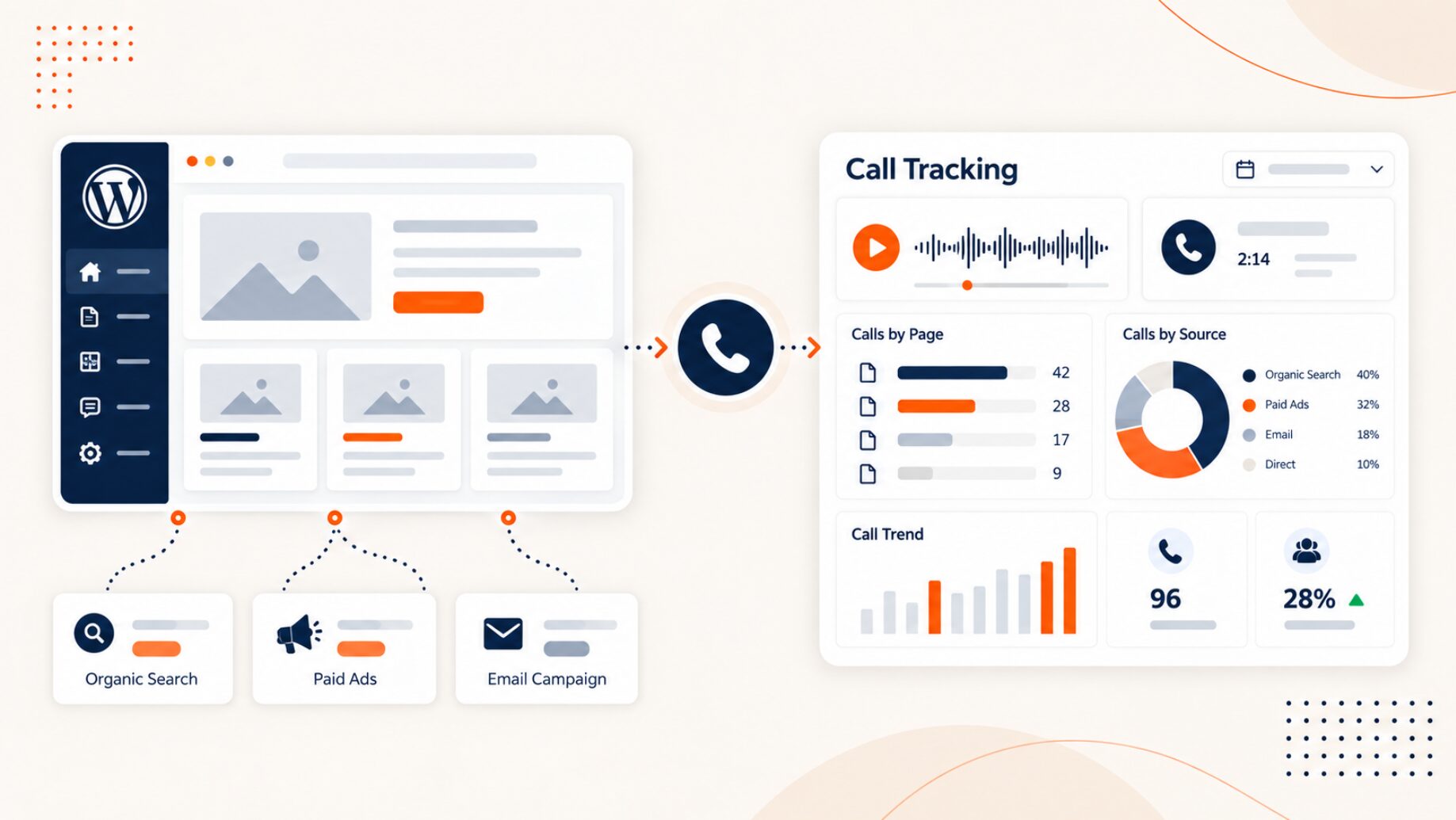
WordPress call tracking connects inbound phone calls with the website pages, traffic sources, and marketing campaigns that generated them.
Suppose a visitor clicks a Google Ads campaign, lands on one WordPress page, visits a service page, and then calls.
The marketing team can see the digital visit, but without call attribution, the team may not know which campaign brought the visitor in, which page started the session, or which page led to the call.
A practical attribution path looks like this:
Campaign/source → WordPress visit → Entry page → Called-from page → Tracking number → Phone call → Lead outcome
The right setup depends on the level of attribution the marketing team needs. A dedicated campaign may only require a static tracking number, while a WordPress site receiving traffic from several channels may need source-level or session-level Dynamic Number Insertion.
What is WordPress call tracking?
WordPress call tracking is the process of connecting phone calls from a WordPress website with the marketing and website activity that happened before the call.
WordPress provides the website environment, but WordPress does not independently connect a telephone conversation with a visitor’s traffic source, campaign, or session. A call tracking platform adds that attribution layer by using tracking numbers and website tracking code.
A WordPress setup may use:
- A fixed tracking number for a defined campaign, location, or page.
- Dynamic Number Insertion that changes the displayed number according to the visitor’s source or campaign.
- Session-level DNI that temporarily assigns tracking numbers so the phone call can retain more detailed visit context.
The goal is not simply to display a different phone number. The goal is to identify which marketing activity contributed to the call.
How WordPress call tracking works
WordPress call tracking connects a phone conversion with the digital information available during the visitor’s website session.
A typical workflow follows these steps:
- A visitor reaches the WordPress website through Google Ads, organic search, paid social, email, a referral, or another source.
- A call tracking script or WordPress integration reads the available visit information according to the configured attribution rules.
- The website displays the appropriate tracking number.
- The visitor browses one or more pages.
- The visitor calls the tracking number.
- The call routes to the organization’s receiving number.
- The tracking platform associates the call with the available source, campaign, page, or session information.
- The marketing or sales team can later add the call outcome or lead status.
AvidTrak supports both static call tracking and Dynamic Number Insertion for connecting website calls with digital marketing activity.
The important point is that the tracking method should match the marketing question.
Static tracking number vs. Dynamic Number Insertion for WordPress
A static tracking number, source-level DNI, and session-level DNI provide different levels of attribution.
| Tracking method | Number behavior | Attribution available | Best fit | Main limitation |
| Static tracking number | A fixed number is assigned to a defined source, campaign, location, or page | Fixed source or placement attribution | A dedicated campaign, location, landing page, or offline promotion | Limited visitor and session detail |
| Source-level DNI | The displayed number changes according to configured source or campaign rules | Source or campaign attribution | WordPress sites receiving traffic from several channels | Less visitor-level detail than session tracking |
| Session-level DNI | A tracking number is temporarily assigned to a visitor or session | Available source, campaign, page, and session context | Multi-channel websites that need more granular attribution | Requires a more advanced setup and enough tracking-number capacity |
When a static tracking number is enough
A static tracking number works well when the marketing team already knows which activity the number represents.
For example, a marketer could assign a dedicated number to:
- A campaign landing page.
- A location.
- A direct-mail campaign.
- An offline promotion.
- Another fixed marketing placement.
Every call to that number can then be associated with the same source or placement.
A static number is often enough when the main question is:
Did this campaign or placement generate calls?
A marketer does not need to assign a unique number to every WordPress page simply to measure phone conversions.
When source-level DNI makes sense
Source-level Dynamic Number Insertion is useful when several channels send visitors to the same WordPress website.
For example, the tracking setup may distinguish visitors from:
- Google Ads.
- Organic search.
- Paid social.
- Email campaigns.
- Referral traffic.
- Direct visits.
The phone number shown on the website can change according to the configured source or campaign rules.
This approach is useful when the main question is:
Which channels or campaigns generate the most phone leads?
When session-level DNI is useful
Session-level DNI is useful when the marketing team needs more detailed visitor-level attribution.
A tracking number can be temporarily associated with a visitor or session. If the visitor moves through several pages before calling, the original marketing source can remain connected with the eventual phone conversion.
Depending on the campaign and configuration, available attribution may include:
- Traffic source.
- Campaign.
- Paid-search keyword.
- Ad group.
- Entry page.
- Called-from page.
- Time on page.
- Visitor location.
Session-level tracking is most useful when the marketing team needs to understand how a particular visit progressed from acquisition to a phone call rather than only counting calls by source.
Detailed pool sizing and deeper configuration belong in the broader Dynamic Number Insertion setup rather than in the WordPress attribution decision.
Do you need a WordPress call tracking plugin?
A WordPress plugin can make call tracking easier to deploy, but a plugin is not the only implementation option.
AvidTrak supports three WordPress deployment approaches:
- An AvidTrak WordPress plugin.
- Google Tag Manager.
- Direct JavaScript installation.
The best option depends on how the marketing team already manages the website and its tracking scripts.
WordPress plugin
A WordPress plugin can reduce the need for manual code changes.
AvidTrak’s account documentation provides a WordPress Plugin Download option and uses the account’s unique HashKey to connect the plugin with the AvidTrak account.
This approach can suit a marketing or website team that wants to manage the call tracking setup through WordPress rather than edit theme files directly.
Google Tag Manager
Google Tag Manager is another option when the marketing team already manages website scripts through GTM.
AvidTrak supports deploying its JavaScript through a Custom HTML tag and configuring which pages trigger the script.
For a team already using GTM, this can keep call tracking within the same tag-management process used for other marketing tools.
The exact tag and trigger configuration belongs in the existing Google Tag Manager deployment documentation.
Direct JavaScript
AvidTrak also supports direct JavaScript installation on WordPress.
AvidTrak’s current WordPress documentation demonstrates adding the script through the WordPress Theme File Editor.
Direct parent-theme editing should not be treated as the default approach for every WordPress website. WordPress child themes allow customizations to remain separate from the parent theme so parent-theme updates do not remove those modifications.
The exact AvidTrak implementation process belongs in the WordPress JavaScript installation documentation.
How to attribute WordPress calls to individual pages
Page attribution becomes more useful when the marketing team separates the page where the visitor entered the website from the page associated with the eventual phone call.
Consider this path:
Google Ads → Landing Page A → Service Page B → Phone call
In this example:
- Landing Page A is the entry page.
- Service Page B is the called-from page.
The two pages answer different marketing questions.
Entry page
The entry page shows where the visitor first entered the WordPress website.
Entry-page data can help marketers evaluate:
- Paid campaign landing pages.
- Organic entry pages.
- Service pages.
- Location pages.
- Other campaign destinations.
A visitor does not necessarily call from the same page where the session started.
Called-from page
The called-from page identifies the page associated with the eventual phone call.
AvidTrak documents both entry-page and called-from-page information for supported call attribution workflows.
This distinction can reveal that a visitor entered through one page but decided to call after reaching another page.
For example:
- The visitor enters through a campaign landing page.
- The visitor moves to a service page.
- The visitor checks a location page.
- The visitor calls from the location page.
Treating the entry page and called-from page as the same field would hide part of that path.
Why the distinction matters
Entry-page data helps answer:
Which pages start sessions that eventually generate calls?
Called-from-page data helps answer:
Which pages are associated with the visitor’s decision to call?
For a WordPress website with service, location, pricing, product, and educational pages, those are different optimization questions.
How to attribute WordPress calls to campaigns and traffic sources
Page attribution becomes more useful when the phone call also retains its acquisition context.
A WordPress tracking setup may separate calls from sources such as:
- Google Ads.
- Organic search.
- Paid social.
- Email.
- Referrals.
- Direct traffic.
- Other tagged campaigns.
The exact attribution detail depends on the traffic source and the configured tracking method.
Google Ads and paid search
Paid-search attribution can provide more information than simply identifying Google Ads as the source.
For supported PPC workflows, AvidTrak documents attribution information such as:
- Keyword.
- Ad group.
- Campaign.
- Entry page.
- Called-from page.
- Visitor and session context.
This allows marketers to connect a phone conversion with the paid-search activity that preceded the call.
Detailed Google Ads call tracking and keyword-level call tracking remain separate topics, so this article only needs the attribution relationship.
Organic search
Organic attribution works differently from paid search.
Search engines do not provide the same direct organic keyword data available through eligible paid-search workflows. AvidTrak instead uses source, entry-page, called-from-page, and other available visit information to provide organic call attribution.
For an SEO or content team using WordPress, the practical question becomes:
Which organic pages contribute to phone leads?
The deeper SEO measurement topic remains on the existing organic call tracking page.
Other campaign sources
WordPress websites may also receive visitors from channels such as paid social, email, referrals, and display campaigns.
A DNI setup can use available information such as traffic sources, campaign values, tagged URLs, referral information, landing-page conditions, and session rules.
The marketing team should use the attribution fields that the channel and tracking configuration actually provide rather than assume that every source exposes the same level of detail.
What call attribution data should a WordPress marketer record?
A useful WordPress call record should connect the phone conversation with enough digital information to support a marketing decision.
| Data field | Why it matters |
| Marketing source | Shows which channel produced the website visit. |
| Campaign | Connects the call with the relevant marketing campaign where available. |
| Ad group | Adds paid-search context where the advertising platform provides it. |
| Keyword | Connects eligible paid-search calls with the keyword associated with the visit. |
| Entry page | Shows where the visitor first entered the WordPress website. |
| Called-from page | Shows the page associated with the eventual phone call. |
| Tracking number | Identifies the number used in the attribution setup. |
| Caller information | Helps identify the caller where the information is available. |
| Call date and time | Supports matching and reporting. |
| Call duration | Adds context to the phone interaction. |
| Answered or missed status | Separates generated calls from successfully handled calls. |
| Recording or transcript | Adds conversation context when recording and transcription are configured. |
| Lead outcome | Helps separate raw calls from meaningful opportunities. |
| CRM record | Connects attribution with later lead activity where supported. |
| Customer outcome | Shows whether the phone lead progressed beyond the initial conversation. |
Not every field is available in every configuration. The attribution model and connected platforms determine the final data set.
Can WordPress call tracking send phone conversions to GA4 and a CRM?
Yes. When the relevant integrations are configured, a call tracking platform can pass phone conversion data from a WordPress tracking workflow into analytics and CRM systems.
GA4
AvidTrak supports reporting phone calls into Google Analytics 4 as events.
The distinction is important:
GA4 receives the phone-call event from AvidTrak; GA4 does not independently observe the telephone conversation.
This allows marketers to review phone conversions alongside other digital activity associated with the WordPress website.
A broader call tracking integrations setup can connect call data with additional marketing and reporting platforms.
CRM workflows
Tracked phone calls can also become part of CRM workflows.
AvidTrak supports integrations with Salesforce, HubSpot, and Zoho. Depending on the integration, call and attribution information can flow into CRM records and related workflows.
The exact record creation, matching, and field behavior depends on the CRM and the implementation.
The deeper integration process belongs in CRM call tracking, while this article only needs to establish why downstream lead data matters.
How AvidTrak fits into WordPress call tracking
AvidTrak can support marketers who need to connect WordPress phone calls with website and campaign attribution.
Relevant AvidTrak capabilities include:
- A WordPress plugin.
- Google Tag Manager deployment.
- Direct JavaScript installation.
- Static tracking numbers.
- Dynamic Number Insertion.
- Source and campaign attribution.
- Entry-page and called-from-page attribution.
- Paid-search keyword attribution where supported.
- GA4 phone-call events.
- Salesforce, HubSpot, and Zoho integrations.
- AI-powered call analysis.
The appropriate setup depends on the marketing question.
A marketer measuring one dedicated campaign may only need a static tracking number. A team comparing several acquisition channels may need source-level DNI. A team that needs session, page, campaign, and paid-search context may need session-level DNI.
After the call is tracked, AI call analytics can add conversation context, while analytics and CRM integrations can connect the call with later reporting.
The implementation should match the required attribution depth rather than add technical complexity without a clear measurement goal.
Frequently asked questions
1. Can WordPress call tracking use an existing business phone number?
Yes. A tracking number can forward calls to an existing receiving number, so the organization does not necessarily need to replace the phone number used by the team internally.
2. Can the same WordPress site track paid and organic phone calls?
Yes. A WordPress call tracking setup can distinguish traffic sources when the appropriate tracking rules are configured. Paid search may provide campaign, ad-group, and keyword context, while organic tracking relies more heavily on source and page information.
3. Can WordPress call tracking work with click-to-call links?
Yes, but the implementation should be tested on both the visible phone number and the underlying tel: destination. Mobile navigation, sticky elements, popups, and call buttons should also be checked after implementation.
4. What should be tested after a WordPress theme or template change?
The marketing team should confirm that the tracking script still loads, eligible phone numbers still change correctly, click-to-call links use the intended number, and a test call appears with the expected attribution.
5. Does WordPress call tracking require a developer?
Not always. A WordPress plugin can reduce manual code work, while Google Tag Manager can be practical for teams that already manage marketing scripts through GTM. Direct JavaScript installation may require more technical access, particularly when theme files are involved.
Connect WordPress phone calls with the marketing activity that generated them
WordPress call tracking is most useful when the tracking method answers a specific marketing question.
A dedicated campaign may only need a static tracking number.
A WordPress website receiving visitors from several channels may benefit from source-level DNI.
A marketing team that needs campaign, session, entry-page, called-from-page, and paid-search context may need session-level DNI.
The complete attribution path becomes:
Campaign/source → WordPress visit → Entry page → Called-from page → Tracking number → Phone call → Lead outcome
For marketers who need to connect WordPress phone leads with pages, campaigns, analytics, and downstream lead data, AvidTrak call tracking provides the relevant product-level next step.


