


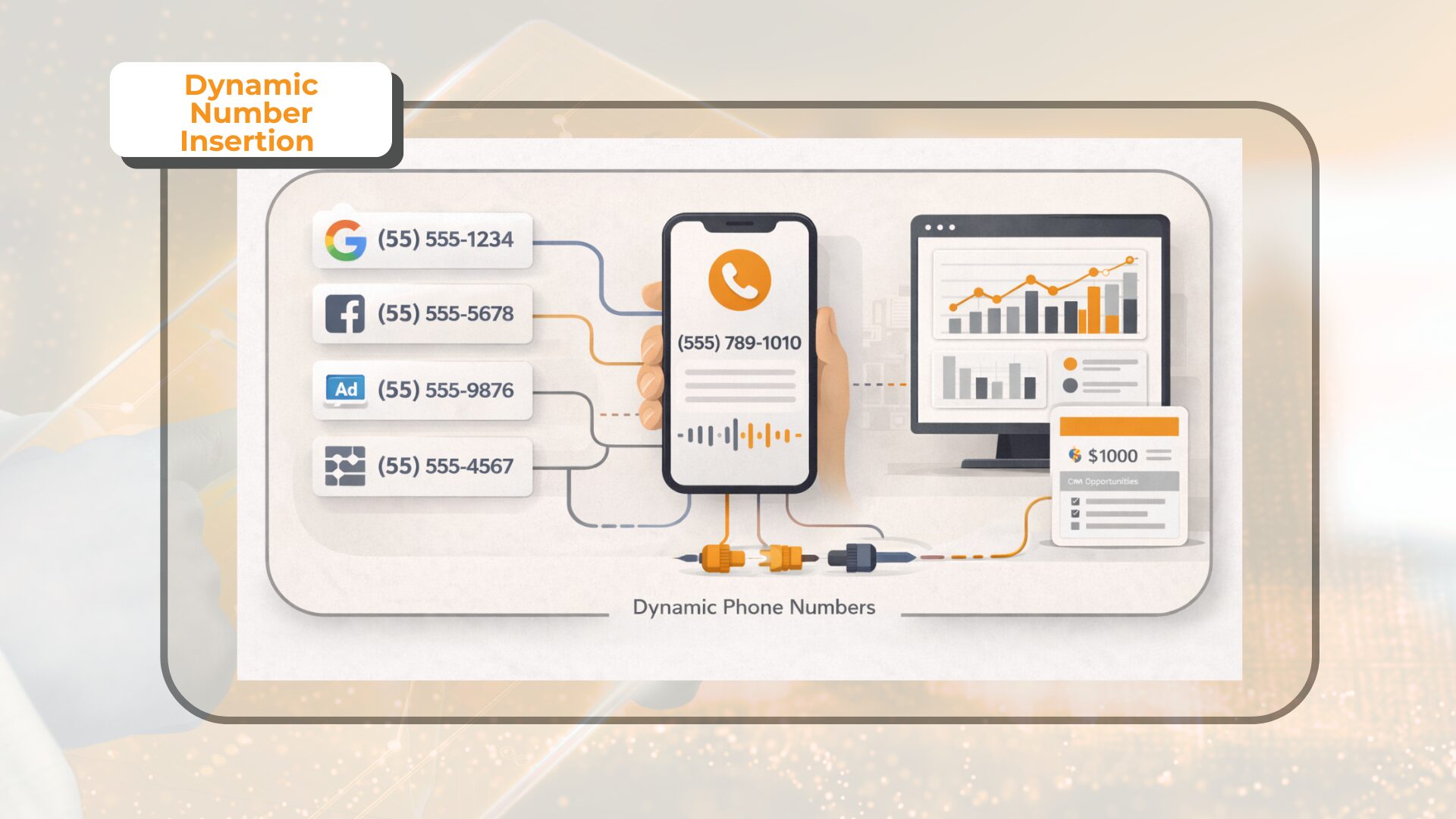
Dynamic number insertion or DNI is a call tracking method that replaces a default website phone number with a tracking number according to defined visitor or traffic-source rules.
For example, a visitor arriving from Google Ads may see a different number from someone arriving through organic search. In a more detailed setup, a number may be assigned to an individual visitor or session so a resulting call can be connected with available campaign and session data.
When the visitor calls, the tracking platform forwards the call to the business while recording the attribution information associated with the tracking number.
The result is a clearer connection between an inbound call and the marketing activity that preceded it. This guide explains how DNI works, the main tracking models, how number pools work, how to set up DNI, and how to fix common problems.
How Does Dynamic Number Insertion Work?
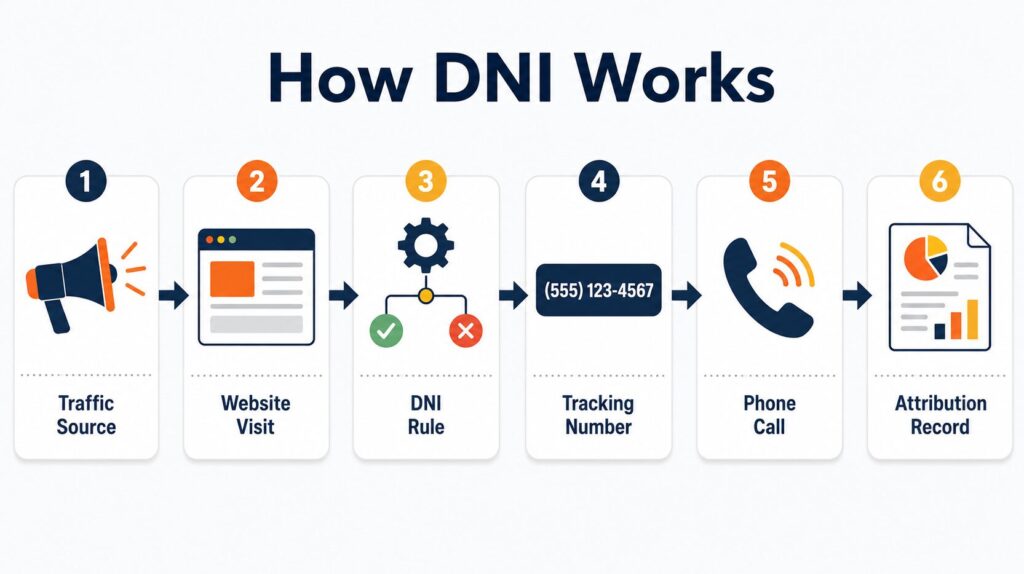 A DNI setup normally combines source detection, number assignment, website number replacement, call forwarding, and attribution reporting.
A typical process works as follows:
- A visitor reaches the website through Google Ads, organic search, paid social, email, a referral, or another source.
- A website script reads available visit data according to the tracking rules.
- The system selects an appropriate tracking number.
- The default number is replaced on eligible page elements.
- The visitor calls the displayed number.
- The call is forwarded to the business.
- The tracking platform associates the call with relevant source, campaign, or session data.
Depending on the configuration, the setup may use UTM parameters, referral data, campaign values, landing-page information, and session logic.
The Three Main Call Tracking Models
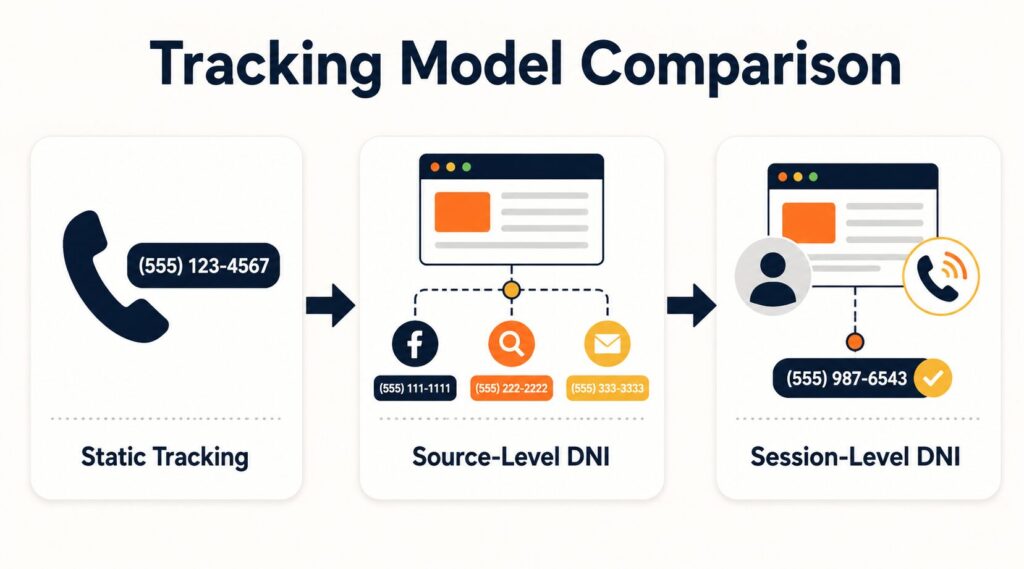 A useful way to think about call tracking setups is to separate them into three models: static tracking, source-level dynamic swapping, and session-level DNI.
The labels used by individual providers can vary, but the underlying distinction helps businesses choose the right attribution depth.
| Tracking Model | How the Number Is Assigned | Best For | Typical Attribution |
| Static tracking | One fixed number is assigned to a campaign or placement | Offline campaigns and simple attribution | Campaign or placement |
| Source-level dynamic swapping | The website number changes according to a source or defined rule | Comparing digital channels and campaigns | Source, medium, or campaign |
| Session-level DNI | A number is temporarily assigned to a visitor or session, often from a shared pool | Detailed digital attribution | Campaign, keyword, ad, landing page, or session data |
Static Call Tracking
Static tracking uses one fixed number for a defined campaign or placement.
For example:
- one number for a billboard;
- one number for direct mail;
- one number for radio;
- one number for a specific offline promotion.
Every caller using that number is attributed to the same source.
Static tracking works well when the main question is:
- Did the billboard or radio campaign generate more calls?
Source-Level Dynamic Swapping
A source-level setup changes the website number according to a traffic source, campaign, or another defined rule.
For example:
- Google Ads visitors see one number;
- organic visitors see another;
- paid social visitors see a third.
The model is useful when a business wants to compare digital sources without assigning a separate number to every individual session.
The main question becomes:
- Did paid search, organic search, or paid social generate more phone leads?
Session-Level DNI
Session-level DNI temporarily assigns a tracking number to an individual visitor or session.
A shared number pool is commonly used because permanently assigning one number to every website visitor would be inefficient.
This model can support questions such as:
- Which campaign, keyword, ad, or landing page was associated with the call?
The available detail depends on the platform, campaign setup, visit data, and connected systems.
What Marketing Data Can Be Connected to a Call Through DNI?
DNI does not independently create every marketing data point. Instead, the call tracking setup connects a phone call with available visit and campaign information.
Depending on the configuration, that information may include:
- source;
- medium;
- campaign;
- paid search keyword;
- ad or ad group;
- landing page;
- referral source;
- UTM parameters;
- visitor session;
- location or campaign rule.
For example, a Google Ads visit may carry campaign data that becomes part of the call attribution record. A tagged email link may provide source and campaign values. An organic visit may be classified according to referral and source rules.
A business comparing three channels may not need session-level tracking. A large paid search program may need more detail.
When Should You Use Dynamic Number Insertion?
DNI is most useful when multiple digital paths can lead to the same phone call.
PPC and Google Ads Campaigns
Paid search accounts may include several campaigns, ad groups, keywords, ads, landing pages, and geographic targets.
A total call count cannot show which parts of the account are associated with phone leads.
DNI can connect website calls with available paid search data so a marketing team can compare performance beyond clicks. AvidTrak’s PPC call tracking software focuses on keyword and source attribution for paid campaigns.
Multi-Channel Marketing
Suppose that a business runs:
- Google Ads;
- organic search;
- paid social;
- email;
- display campaigns.
Several channels may send visitors to the same website and the same default phone number.
DNI helps separate call activity according to the tracking rules in place.
Marketing Agencies
An agency may need to answer:
- Which client campaign generated the call?
- Which source is producing phone leads?
- Which paid search terms are associated with calls?
- Which client accounts are improving?
- Which campaigns require closer review?
DNI can support separate tracking structures across clients, campaigns, and channels.
AvidTrak provides call tracking software for agencies managing PPC, SEO, and multi-client reporting.
Multi-Location and Franchise Businesses
A multi-location business may receive visitors through city pages, regional campaigns, local landing pages, franchise pages, and paid search campaigns.
A structured tracking setup can preserve marketing attribution while a separate routing process sends the call to the appropriate location.
AvidTrak provides a dedicated franchise call tracking solution for location-based requirements. When a call also needs to reach a particular office, department, or region, advanced call routing can support the call flow.
Call-Driven Service Businesses
DNI is useful when a phone call is a major lead action.
Examples include:
- law firms;
- healthcare providers;
- home service businesses;
- automotive businesses;
- insurance companies;
- education providers;
- local service businesses.
A call may represent a consultation, appointment request, quote, booking, or urgent service need.
How to Set Up Dynamic Number Insertion
A DNI setup should begin with the reporting question rather than the script.
Step 1: Define the Required Attribution Level
Start by deciding what the business needs to know.
For example:
- Which channels generate calls?
- Which campaigns produce phone leads?
- Which paid search keywords are associated with calls?
- Which landing pages generate phone conversions?
Then select the appropriate model:
- static tracking;
- source-level dynamic swapping;
- session-level DNI.
Avoid adding session-level complexity when source-level reporting is enough.
Step 2: Choose the Traffic Sources to Track
Identify the sources that should trigger number replacement.
Examples may include:
- Google Ads;
- Microsoft Advertising;
- organic search;
- paid social;
- email;
- referral traffic;
- selected landing pages.
Clear boundaries make the setup easier to test and maintain.
Step 3: Install the DNI Script and Identify Every Number Target
Add the tracking script across relevant website pages.
Then identify every place where the business number appears, including:
- headers;
- footers;
- contact pages;
- landing pages;
- service pages;
- location pages;
- mobile menus;
- sticky call buttons;
- pop-ups.
Check both the visible number and the underlying tel: link.
A number can appear correct on the page while the click-to-call link still points elsewhere.
Step 4: Configure Source and Session Rules
Define how eligible visits should be classified.
Depending on the setup, rules may use:
- UTM values;
- referral data;
- campaign information;
- landing-page conditions;
- session logic;
- connected advertising data.
Keep campaign and source naming consistent.
For session-level tracking, also decide how the setup handles:
- returning visitors;
- attribution windows;
- direct return visits;
- changes in source;
- assignment duration.
Step 5: Configure the Number Structure
A static or simple source-level setup may use fixed assignments.
A session-level setup will often require a shared number pool.
Account for:
- eligible traffic;
- peak simultaneous sessions;
- assignment duration;
- campaign spikes;
- number reuse rules;
- fallback behaviour.
The goal is sufficient capacity for the selected attribution model rather than the largest possible pool.
Step 6: Connect Relevant Reporting Platforms
Connect call data with the systems used by marketing and sales teams when the workflow requires it.
Examples include:
- advertising platforms;
- analytics platforms;
- CRM systems;
- reporting tools.
AvidTrak’s call tracking platform integrations include advertising, analytics, CRM, and reporting connections.
Step 7: Test the Full Attribution Path
Test each important source before relying on the data.
For every test, confirm that:
- the correct number appears;
- the click-to-call link updates;
- the call reaches the correct destination;
- the expected attribution appears;
- the fallback number works;
- relevant pages behave consistently.
Run tests through the real traffic path where possible.
A manually opened landing page may not behave the same way as a visit carrying campaign information.
How Do Number Pools Work, and How Many Numbers Do You Need?
A number pool is a group of tracking numbers available for temporary assignment. The concept matters most in session-level DNI.
Imagine that several eligible visitors are active on a website at the same time. A session-level setup may need enough available assignments to distinguish those visits according to the selected tracking model.
After an assignment is no longer required, the number can return to the available pool according to the platform rules.
There is no universal pool size for every website.
The requirement depends on:
- peak concurrent eligible traffic;
- assignment duration;
- attribution windows;
- campaign traffic spikes;
- return behaviour;
- reuse rules.
Monthly traffic alone is not enough.
A practical sizing process should:
- identify the traffic included in DNI;
- review peak simultaneous activity;
- account for the assignment period;
- consider campaign spikes;
- monitor availability after launch;
- adjust capacity when traffic changes.
When the requirement is only source-level dynamic swapping, a session-level pool may not be necessary.
Dynamic Number Insertion Best Practices
A reliable setup depends on clear rules and regular testing.
Match the Setup to a Business Question
Every attribution level should answer a real question.
For example:
- channel-level tracking compares sources;
- campaign-level tracking compares campaigns;
- keyword-level tracking assesses paid search terms;
- session-level tracking connects calls with more detailed visit data.
Do not collect detail without a plan for using it.
Keep Source Naming Consistent
Use consistent names across:
- UTM parameters;
- advertising campaigns;
- source rules;
- analytics reports;
- call reports.
Inconsistent naming can split related traffic across separate reporting labels.
Maintain a Fallback Call Path
A visitor should still see a working number when a specific dynamic rule cannot be applied.
Fallback behaviour may be needed for missing parameters, unclassified traffic, script errors, or number availability issues.
Test Visible Numbers and Click-to-Call Links
Check both:
- the visible number text;
- the underlying tel: destination.
Repeat the check across mobile navigation, sticky elements, pop-ups, and other call buttons.
Review the Setup After Website or Campaign Changes
Re-test DNI after:
- a redesign;
- a CMS update;
- a template change;
- a tag-manager change;
- a caching change;
- a new landing-page launch;
- a major campaign change.
Common DNI Problems and How to Fix Them
A useful troubleshooting process should identify where the attribution path failed.
| Problem | Likely Cause | What to Check |
| The number does not change | The script is missing, blocked, or not matching the page element | Check script loading, selectors, rules, and page coverage |
| The wrong number appears | The classification or assignment rule is incorrect | Review UTM values, referrer rules, session logic, and rule priority |
| The text changes but the call link does not | The tel: destination is not included in the replacement | Test the link separately from the visible text |
| Some pages work and others do not | The installation or selector is incomplete | Review templates, headers, footers, and landing pages |
| Attribution becomes unreliable during traffic peaks | The session-level pool may lack available capacity | Review simultaneous eligible traffic and assignment duration |
| Direct traffic receives an earlier source | Returning-visitor rules may still be active | Review attribution windows and session rules |
| An old number keeps appearing | Caching may be affecting page behaviour | Test cache, CDN behaviour, and script execution |
| Calls connect but campaign data is missing | The call route works but the data connection is incomplete | Review campaign values, platform connections, and reporting rules |
| A website update breaks number replacement | A template or selector changed | Re-test every number target after the release |
Can Dynamic Number Insertion Affect SEO?
A DNI setup should be reviewed carefully when a website also depends on stable local business information.
The main issue is not simply the use of a tracking number. The implementation should define how tracking numbers interact with business information that is intended to remain stable.
Review the setup across:
- structured data;
- business profiles;
- directory listings;
- location pages;
- local landing pages;
- visible website numbers;
- click-to-call links.
For a multi-location business, define the relationship between:
- the primary location number;
- the tracking number;
- the displayed number;
- the receiving number;
- the routing rule.
Avoid broad assumptions about SEO impact without testing the actual implementation.
How AvidTrak Supports DNI and Call Attribution
AvidTrak supports Dynamic Number Insertion as part of AvidTrak’s wider call tracking and attribution platform.
Imagine that a prospect clicks a paid search ad, reaches a service page, and calls instead of submitting a form. With the appropriate setup, AvidTrak can connect the call with available campaign or keyword data and include the call in related reporting workflows.
Depending on the configuration, AvidTrak supports:
- Dynamic Number Insertion for website call tracking;
- campaign and keyword-level attribution;
- tracking numbers across marketing sources;
- localized DNI;
- routing workflows;
- advertising, analytics, and CRM integrations;
- agency and multi-client requirements.
The appropriate configuration depends on the attribution depth, traffic pattern, number structure, routing requirements, and reporting workflow.
Is DNI Right for Your Business?
DNI is a strong fit when phone calls matter as conversions and the source of those calls affects marketing decisions.
Consider DNI when a business needs to:
- compare calls across digital channels;
- connect paid search calls with campaign or keyword data;
- measure phone leads from several landing pages;
- separate attribution across agency clients;
- track calls across locations;
- connect phone activity with wider reporting systems.
A simpler setup may be enough when the business only needs one fixed number for each campaign or placement.
The best model is the one that answers the required attribution question without unnecessary complexity.
Frequently Asked Questions
1. Does dynamic number insertion require a number pool?
Not always. A source-level dynamic setup may use defined number assignments for selected sources. A session-level setup commonly uses a shared pool because numbers are temporarily assigned to visitors or sessions.
2. How many tracking numbers do I need for DNI?
The answer depends on the tracking model, peak concurrent eligible traffic, assignment duration, attribution window, campaign spikes, and reuse rules. Total monthly traffic alone does not determine the required pool size.
3. Can DNI track Google Ads keywords?
A call tracking setup can connect calls with available paid search data when the platform, campaign configuration, and integrations support that attribution level. AvidTrak supports keyword-level attribution for PPC use cases.
4. Can DNI track organic search calls?
Yes. A DNI setup can classify eligible organic visits and associate resulting calls with the relevant source according to the tracking rules and available visit data.
5. Does DNI affect local SEO?
The effect depends on implementation. Review how tracking numbers interact with structured data, business profiles, directories, local pages, and location-specific phone information.
6. What happens when a visitor returns later?
The result depends on the session and attribution rules. Some setups preserve an earlier assignment for a defined period, while others classify the return visit according to a new source or session.
7. What happens if a session-level number pool runs out?
The behaviour depends on the platform and configuration. A planned setup should define fallback behaviour and monitor number availability so visitors continue to have a working call path.
8. Does every business need dynamic number insertion?
No. A business that only needs fixed campaign or offline attribution may be better served by static tracking numbers. DNI is more useful when website calls need to be connected with changing digital sources or sessions.
Connect Phone Leads With the Marketing That Generated Them
When a prospect calls instead of submitting a form, the phone conversation should not become a gap in marketing reporting.
AvidTrak helps businesses and agencies connect inbound calls with campaigns, keywords, and marketing sources while supporting related reporting, integration, and routing requirements.
Start by selecting the required attribution level. Then define the traffic sources, number structure, session rules, and reporting workflow before launch.
Review AvidTrak’s call tracking pricing and start a free trial to track phone leads back to the marketing activity that generated them.


