



Call leads lose attribution when marketing context is missing, assigned to the wrong call, or lost between the call tracker and another system. A reporting mismatch can look similar even when the underlying records are correct.
To diagnose the problem, trace one identifiable call, find the first point where its evidence becomes wrong, and test that specific handoff.
This guide provides a decision tree, seven diagnostic checks, a controlled test-call procedure, worked examples, and a reusable support template.
First, confirm what is actually missing
A phone-number click, a logged call, an answered conversation, and a qualified lead are different events. A click can happen without a connected call, while someone can manually dial a number without clicking it. Keep those definitions separate when reviewing Google Analytics call tracking.
Before changing settings, write down:
- The affected record: Call ID where available, dialed number, timestamp, time zone, and tracking account.
- The disputed field: Its exact name and the system displaying it.
- The expected rule: Source-level, session-level, first-touch, last-touch, or another documented rule.
- The affected conditions: Page, device, traffic source, consent state, and when the issue began.
Then locate the earliest problem:
| Observation | Investigation starts here |
| The business received the call, but the tracker has no record | Dialed number, account, log filters, and call path |
| The tracker logged it with missing or incorrect source information | Number assignment, campaign context, and session rules |
| Tracker data is correct, but CRM activity or call-source fields are wrong | Delivery, record matching, mapping, and later updates |
| Tracker and CRM data are correct, but a downstream report differs | Event delivery, eligibility, report scope, dates, and filters |
Compare equivalent fields. GA4 separates first-user, session, and event-scoped attribution. In HubSpot, Original Traffic Source and Latest Traffic Source concern web interactions; Record Source describes how the CRM record was created. Those values can legitimately differ.
Preserve an affected example before editing. Keep the original record and relevant configuration evidence so you can distinguish a correction from a change in measurement rules.
Decision tree: Where did call attribution break?
Use the expected value under your configured rules, rather than assuming every source field should describe the latest visit.
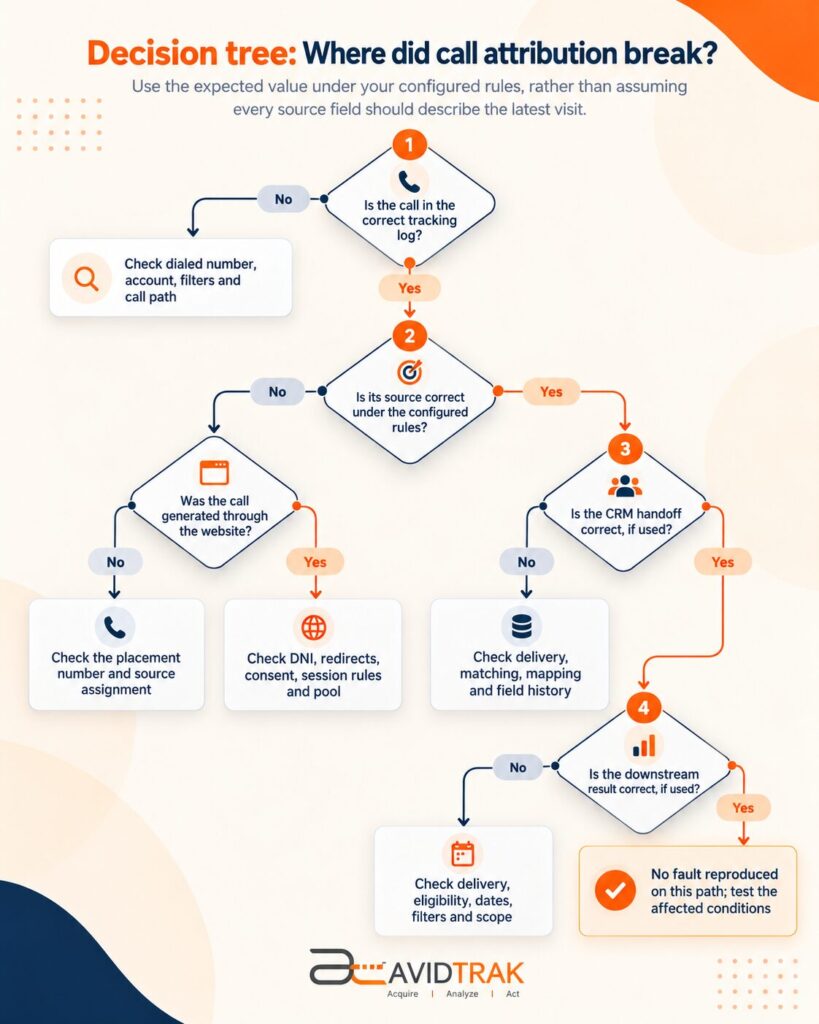 The sequence is: call record, source evidence, CRM handoff, then downstream reporting. Skip systems your setup does not use.
A call from an ad, business listing, printed placement, or saved number may never pass through the website. Investigate that number’s assignment instead of expecting website DNI to explain the call.
Seven places where call leads lose attribution
1. The caller bypasses the tracking number
A ringing business phone proves delivery, not that the call passed through the tracker.
Distinguish the displayed number, dialed number, and receiving destination. The receiving number can differ from the tracking number without indicating a problem.
Check the actual placement used: a mobile button, listing, ad, email, or saved contact. Also confirm the tracking account and time zone before concluding that a call is absent.
Check: Match the dialed number and timestamp to the intended tracking account. Remove restrictive log filters.
Fix: Correct the placement or routing configuration. If a verified tracking number was dialed but no record exists, request a provider trace using the number and precise time.
Pass condition: A repeat call appears in the correct account and reaches the intended destination.
2. DNI updates the visible number but misses the dial link
Dynamic number insertion can work on one element and fail on another.
Inspect both the rendered text and its tel: destination. A mobile button can display a tracking number while dialing the main business line. Sticky buttons, pop-ups, and different templates may have separate implementations.
Check whether an application rerender or another number-swapping script changes the element afterward. Finding a script in page source does not prove that it ran successfully.
Check: Inspect the affected element and browser requests before and after the action that exposes the problem.
Fix: Correct the target or installation using the provider’s supported method. Resolve a proven conflict; multiple tags are not automatically a fault.
Pass condition: The displayed number and dial link remain correct through the affected navigation, mobile state, or pop-up interaction.
3. A redirect or domain change removes the source context
Campaign information may arrive at the first page and disappear before the tracker uses it.
For a Google Ads workflow that depends on a click identifier such as GCLID, check that the required identifier survives the landing path. Google specifically documents redirects stripping this information.
For multi-domain paths, investigate each measurement system separately. GA4 cross-domain configuration can preserve its own identifiers, but it does not automatically configure the call tracker’s session handling.
Check: Preserve the browser’s Network log and follow every redirect and domain handoff. Compare the information available at the point of number assignment.
Fix: Preserve required parameters and configure each relevant system’s documented domain handling. Do not carry campaign labels onto unrelated internal links, where they can distort measurement.
Pass condition: The source information needed by the selected workflow is available when the number is assigned and the call is recorded.
4. Consent or script execution changes the tracking behavior
A consent manager, browser extension, blocked request, or JavaScript error can affect which code runs.
Tag Assistant can help inspect Google tag execution and consent state. It does not prove that a separate call-tracking script selected the right number; check that script directly.
In Google’s basic consent mode, Google tags are blocked until the visitor interacts with the consent banner and are not loaded if consent is denied. Advanced mode can send measurements without cookies under denied consent. Third-party tracking behavior depends on its own implementation.
Check: Record the actual consent choice and browser conditions. Compare supported states without overriding the site’s consent policy.
Fix: Correct unintended sequencing or configuration errors while preserving the visitor’s choice.
Pass condition: Behavior matches the documented implementation. Reduced individual-level detail under a restricted state may be an expected limit rather than a defect.
5. Pool capacity or session rules produce the wrong association
A session-level number pool needs enough capacity for the traffic covered by its assignment rules.
CallRail documents that an undersized pool can show the same number to multiple visitors and associate the wrong visitor history with a call. Exact sizing and fallback behavior vary by provider.
Review assignment duration, eligible traffic, peak activity, number reuse, and available capacity alerts. A returning visitor may also retain an earlier source under the configured rules.
Check: Compare affected timestamps with assignment records and traffic conditions. Confirm the intended handling of return visits.
Fix: Adjust the proven capacity or rule issue with the provider. Avoid applying a universal pool-size formula.
Pass condition: Associations remain correct under comparable traffic and assignment conditions. A quiet-period test alone cannot establish that a peak-traffic problem is resolved.
6. The CRM loses or overwrites correct source data
If the tracker’s source is correct, investigate the CRM handoff before changing website tags.
Check the outgoing data, delivery response, destination account, field mapping, and activity association. A successful request does not prove that the destination stored the correct values.
Inspect the saved activity and field history. A workflow, merge, or later integration update may change a value after it arrives. Caller ID alone can also be an unreliable person-level match when lines are shared, withheld, or formatted inconsistently.
Check: Trace one call into its intended CRM activity and review the stored values after subsequent workflows run.
Fix: Correct delivery, matching, mapping, or overwrite behavior. Keep call-specific source data separate from fields that intentionally describe the contact’s first interaction.
Pass condition: The right activity is associated with the right record, and the relevant call-source fields remain correct.
7. Reporting excludes a correctly attributed call
A call can retain its source and still be excluded from a conversion report.
Check the selected event or conversion action, destination account, minimum duration, qualification rules, import requirements, processing status, reporting dates, and filters.
Google documents call-duration thresholds and click-date reporting as reasons call and conversion totals can disagree.
For imports, inspect record-level errors where available. Google Ads’ offline diagnostics provides upload history and errors; sending a batch does not prove that every event was accepted or credited.
Check: Separate event delivery, import processing, and report treatment. Confirm that the event qualifies under the chosen method.
Fix: Correct the proven issue. Changing qualification rules merely to match call totals changes the measurement definition.
Pass condition: An eligible event receives the intended reporting treatment, or its exclusion has a documented explanation.
How to run a controlled attribution test call
Test source continuity first, then downstream conversion eligibility. A manually tagged website visit can validate classification and handoffs without establishing a genuine paid-ad conversion.
Step 1: Define exactly what should happen
Give the test a distinct label and record:
- Entry source and landing path.
- Tracking account and expected number assignment.
- Exact source field and expected value.
- Attribution rule and relevant time window.
- CRM activity and destination event, if used.
Decide whether this test is checking source classification, call delivery, CRM mapping, or advertising eligibility. One test may cover several checkpoints, but each needs its own expected result.
Step 2: Record the test conditions
Use an isolated browser session for the baseline. Record device, browser, consent choice, and relevant extensions.
Test returning visitors and restricted states separately. Private browsing does not recreate every normal visitor’s environment, and a fresh session does not erase an existing CRM contact’s history.
Coordinate with the receiving team and agree how test records will be identified and excluded from business-performance reporting.
Step 3: Follow the real entry path
Use an approved QA campaign link or the provider’s documented test method. Include the redirects, navigation, and domains used by affected visitors.
Record the final page and whether the required source information survives. Keep sensitive identifiers in the restricted evidence packet.
For advertising validation, follow the relevant platform’s testing requirements. Inventing an ad-click identifier does not create a valid advertising interaction.
Step 4: Inspect the number, then place the call
Check the displayed number and actual dial target on the affected element.
Repeat after opening the mobile menu, sticky button, or pop-up if relevant. Then dial the intended tracking number and record the call start time, time zone, dialed number, call status, and call ID where available.
Dialing the receiving destination directly cannot validate a path that requires calling the tracking number.
Step 5: Trace the resulting records
Use this evidence sheet for each test:
| Checkpoint | Record before testing | Evidence after testing |
| Website | Expected source condition and number assignment | Final page, consent state, displayed number, dial target |
| Call tracker | Expected account, source field, and attribution rule | Call ID, timestamp, status, and observed source |
| CRM, if used | Expected activity association and mapped fields | Activity ID, record ID, saved values, subsequent updates |
| Analytics or ads, if used | Expected event and applicable eligibility rules | Delivery reference, processing result, report scope, observed treatment |
Use a stable external call ID where supported. If matching by time and number, verify the match rather than assuming nearby records represent the same call.
Step 6: Classify the result accurately
| Result | Meaning | Next action |
| Passed | The tested checkpoint matches its defined expectation | Continue downstream or test the next condition |
| Failed | Evidence shows where the expected value or event becomes incorrect | Assign that boundary to its owner |
| Expected limit | Behavior matches a documented consent, scope, or eligibility limit | Record the explanation; do not force artificial agreement |
| Pending or inconclusive | Processing is incomplete, evidence is insufficient, or the affected condition was not reproduced | Keep the investigation open and define the next test |
An integration can pass its delivery check while a conversion test remains pending. Record those results separately.
Step 7: Retest the fix and a working control
Change one relevant variable, then repeat the affected path under comparable conditions. Also repeat a path that previously worked.
Use the original acceptance criteria. A source value manually edited after the call, a looser qualification rule, or a different test path does not prove that the original fault was fixed.
For intermittent or peak-traffic issues, validate under representative conditions with the provider. One successful call is evidence about that test, not proof that the whole account is healthy.
Three examples of attribution diagnosis
These are illustrative examples, not customer incidents or results from live account testing.
Example 1: Mobile calls bypass the tracker
Observation: Desktop calls appear in the tracker. Calls from a mobile sticky button reach the business but are missing from the tracking log.
Decisive evidence: The button displays the swapped number, while its rendered dial link points to the main business line.
Correction: Update the affected element using the supported number-replacement method.
Acceptance test: Open the sticky button, verify both values, place a call, and find the resulting tracking record and source. Repeat the desktop control to check for a regression.
Example 2: A CRM workflow removes valid source information
Observation: The tracker records the expected campaign. A dedicated CRM call-source field is correct on arrival and blank later.
Decisive evidence: Delivery evidence contains the source; field history identifies a subsequent workflow update.
Correction: Fix the overwrite behavior rather than changing website tracking.
Acceptance test: Follow a new call through initial storage and the later workflow. The call-source value should remain correct, while valid original-contact source information remains intact.
Example 3: Different source fields are both correct
Observation: A call record shows paid search, while a GA4 first-user report shows organic search.
Decisive evidence: The visitor first arrived through organic search and later returned through a paid campaign before calling. The reports describe different scopes.
Correction: Compare the relevant fields and attribution rules. No historical source rewrite is needed.
Acceptance test: Confirm that the first-user history and the later session or call evidence each match their own definitions.
A support handoff template your team can reuse
Send a concise incident summary with supporting evidence. The objective is to identify the first failing boundary and make the problem reproducible.
Incident title:
Call attribution issue affecting the named account, source, page, or device.
Expected versus actual:
Exact system and field; expected value under the configured rule; observed value or missing event.
Scope and timing:
When the issue began, last known working example, affected conditions, and whether the failure is consistent or intermittent.
Call references:
Affected call IDs where available, a working control, and timestamps with time zones. For a missing call, supply the dialed number and precise time through the approved support channel.
Reproduction steps:
Entry path, browser, device, consent state, fresh or returning session, navigation, and call element used.
Supporting evidence:
Rendered number and dial target, relevant assignment records, script errors, delivery references, saved CRM values, field history, and import messages.
Recent changes:
Website release, redirect, tag-container version, consent update, number-pool change, CRM workflow, or integration change.
Checks and current status:
What was tested, what changed, whether the control passed, and which checkpoints are passed, failed, limited, or pending.
Requested next action:
The specific trace or configuration review needed, responsible owner, and agreed acceptance test.
Share necessary evidence through the approved support channel. Remove credentials and unnecessary personal information from screenshots, logs, and exports.
| First failing boundary | Likely owner |
| Number display, dial link, script, or redirect | Website or tag-management owner, with tracking-provider support |
| Number assignment or verified missing tracking call | Call-tracking or phone provider |
| Correct tracker data becoming wrong in the CRM | CRM administrator or integration owner |
| Correct records excluded or misread downstream | Analytics or paid-media owner |
How AvidTrak helps with attribution troubleshooting
AvidTrak supports DNI, campaign and source attribution, call reporting, and CRM connections including Salesforce, HubSpot, and Zoho. These capabilities help teams compare call-source evidence with the corresponding CRM activity.
Use CRM call tracking to investigate the handoff between the call and the working lead record. In AvidTrak call reports, inspect the affected call and available source fields before changing the website setup.
For an existing implementation, contact AvidTrak support with the incident template above. Ask for a trace of the specific number assignment, missing record, or integration boundary.
The available evidence determines what can be diagnosed or recovered. No tracking platform can guarantee an original campaign identifier that was never recorded.
Frequently asked questions
Can attribution be recovered for older calls?
Sometimes, if retained call records, assignment history, campaign identifiers, or delivery logs support a reliable match. Recovery also depends on retention and the destination’s reprocessing rules. Keep evidence-based corrections separate from original values, and check duplicate handling before any supported reimport. Do not relabel historical calls by assumption.
Does caller ID identify the marketing source?
No. Caller ID identifies the calling line where available, not the campaign or ad click. Attribution requires a separate connection through a tracking number, visit information, placement mapping, or another supported method. Caller ID can help locate a record, but it does not prove marketing origin.
What happens when someone calls a saved or shared tracking number later?
The call may still connect, while detailed visitor attribution depends on assignment history and provider rules. A number copied into a message or saved contact may be dialed outside the original visit. Investigate delayed calls with the provider and use stable placement numbers where appropriate.
Does a missing keyword prove that attribution failed?
No. A setup may provide source- or campaign-level reporting without keyword-level detail. Available information depends on the traffic source, configuration, and advertising connections. Confirm that the specific keyword field is supported and expected for that call before treating a blank value as a fault.
Can AI rebuild the original campaign from a call transcript?
A transcript may reveal intent, a service, or an offer the caller mentions. That does not prove the originating campaign or click. Keep AI-inferred context separate from attribution verified through assignment records, identifiers, or other reliable evidence.
Close the incident with evidence
Fix the first proven failure, then repeat the affected path and a working control under the original rules.
Document the result, any remaining measurement limits, and whether historical records require a separate review. The issue is resolved when the relevant checkpoints pass or the apparent discrepancy has a verified explanation—not simply when two totals look alike.


