One Dashboard for Call Tracking
Across Every Channel, Campaign, and Location

Know which campaigns drive calls, what those calls lead to, and how your marketing is performing, all from one dashboard.

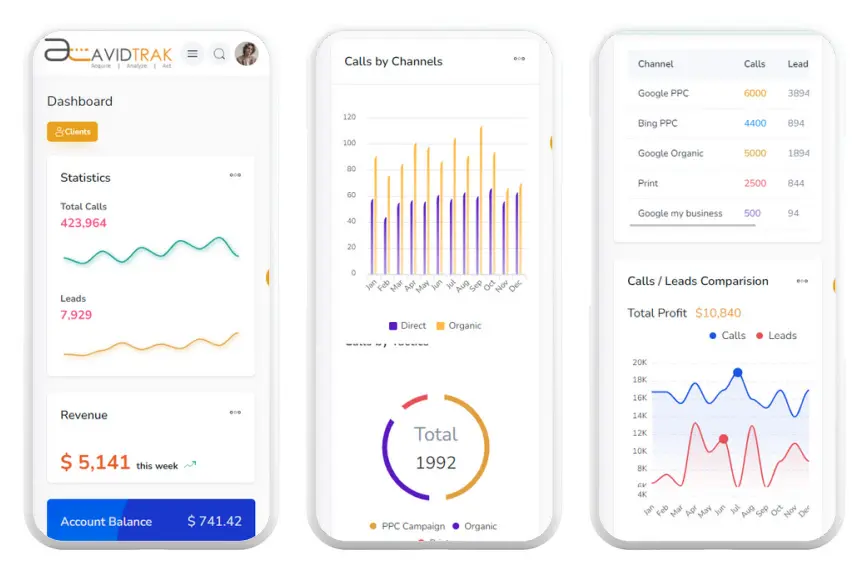
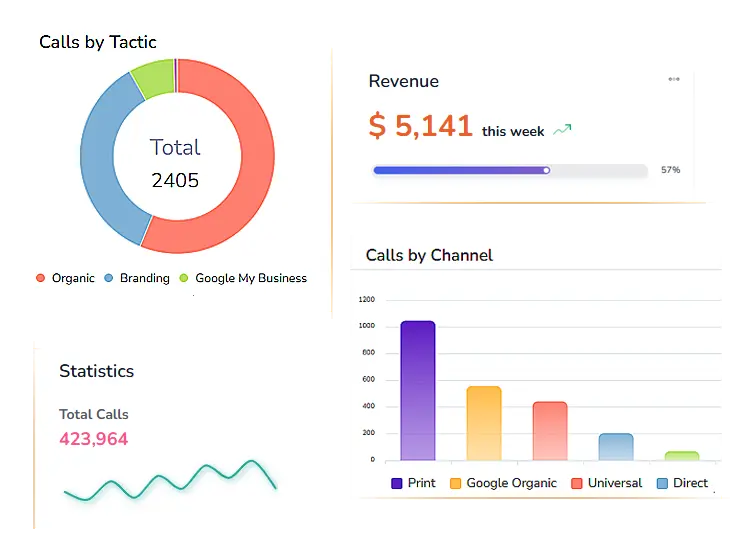
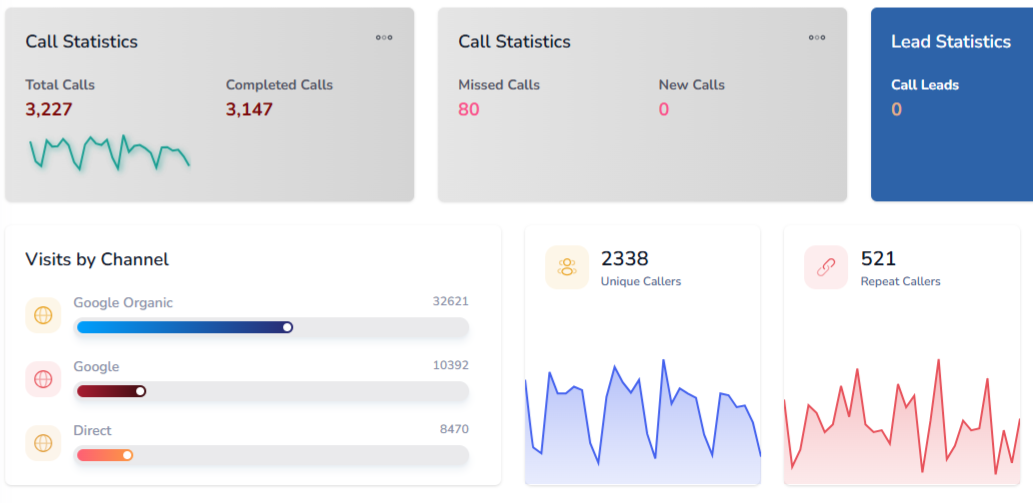
AvidTrak's dashboard for call tracking gives marketing teams, agencies, and businesses a single view of call activity, campaign attribution, and lead outcomes. See which channels, keywords, and pages are generating calls, review AI-powered transcription summaries, and track performance across every campaign without digging through separate reports or tools.
Dashboard for Call Tracking – AvidTrak

14-day free trial

No credit card required

No white-label setup fees

What Is a Dashboard for Call Tracking?

A dashboard for call tracking gives teams one place to monitor call activity, campaign attribution, outcomes, and lead performance. AvidTrak dashboards combine call volume data, campaign source attribution, AI-powered transcription summaries, tables, graphs, and customizable views so marketers, agencies, and sales teams can review phone-lead performance without switching between tools.

  • Connect every inbound call to the exact campaign, keyword, or channel that drove it
  • Use AI-powered conversation outcome extraction to understand what happened on each call, from bookings to pricing inquiries
  • Monitor call volume, lead quality, and team performance through customizable charts and tables

Every Metric That Matters, Visible in One Call Tracking Dashboard

Campaign and Source Attribution Dashboard

Campaign and Source Attribution

Tie calls to campaigns: see which Google Ads keywords, SEO pages, social posts, or offline campaigns generated each inbound call down to the keyword level

Track every channel: AvidTrak's dashboard covers paid search, organic, email, display, social media, print, radio, and TV in one attribution view

Call Activity and Outcomes Dashboard

Call Activity and Outcomes

Monitor call volume by source: Review inbound call counts by campaign, date range, channel, or location without pulling separate reports from each platform.

Extract outcomes automatically: Use AI-powered conversation outcome extraction to tag each call for bookings, pricing inquiries, or support requests, so your dashboard reflects what calls actually produced.

Custom Tables and Graphs for Call Tracking

Custom Tables and Graphs

Control what you see: Build your call tracking dashboard with the metrics that matter to your team. Filter by date, campaign, number, or outcome and display results in tables or graphs.

Compare performance over time: Use customizable views to run month-over-month or campaign-level comparisons directly from your dashboard without exporting data manually.

Operational Performance and Integrated Reporting

Operational Performance

Track agent and queue activity: AvidTrak's Lead Maximizer reporting covers queue volume, hold time, dropped calls, agent efficiency, call disposition, whisper usage, and barge activity.

Review caller experience metrics: See how callers move through your IVR, where drop-offs happen, and how quickly agents respond. All of this is visible from your call tracking dashboard.

Operational Performance and Integrated Reporting

Integrated Reporting Across Platforms

Connect your existing tools: AvidTrak pushes call data directly into Google Ads, GA4, Salesforce, HubSpot, Zoho, and Looker Studio so your dashboard data flows into the platforms your team already uses.

Unify online and phone lead data: When call tracking data connects with your CRM and ad platforms, your dashboard gives a complete picture of which marketing tactics are generating leads and at what cost.

What AvidTrak's Call Tracking Dashboard Actually Does

Custom Dashboard Views

Custom Dashboard Views

Choose which metrics and visuals appear in your dashboard for call tracking. AvidTrak lets you build the view your team needs without being locked into a default layout.

Call Attribution Data

Call Attribution Data

Connect every inbound call to the campaign, keyword, channel, or page that drove it. AvidTrak tracks paid search, organic, social, email, and offline sources all in one call tracking dashboard.

Operational & Queue Reporting

Operational & Queue Reporting

Monitor queue volume, agent efficiency, hold time, and call disposition through AvidTrak's Lead Maximizer reporting. Sales teams get a clear view of inbound call handling.

Custom Reports & Dashboard Delivery

Custom Reports & Dashboard Delivery

Schedule and deliver reports from your call tracking dashboard to the right people automatically. Choose your reporting cadence, such as daily, weekly, or monthly, and control exactly which fields appear.

Agency-Ready Reporting

Agency-Ready Reporting

Manage all client dashboards from one login with white-label reporting and role-based access. Each client sees only their own data while your agency tracks performance across every account.

AI-Powered Transcription & Outcome Visibility

AI-Powered Transcription & Outcome Visibility

Review call outcomes directly from your dashboard to see what each call produced, such as a booking, pricing inquiry, or support request, without listening to recordings manually.

Dashboard for Call Tracking Across Marketing, Agency & Ecommerce Teams

Call Tracking Dashboard for Marketers

Dashboard for Marketers

Attribute calls to campaigns: See which Google Ads keywords, SEO pages, email campaigns, or display ads are generating inbound calls and at what volume.

Review call outcomes by campaign: AI-powered conversation outcome extraction tags each call with a result, such as a booking or pricing inquiry, so you know which campaigns produce quality leads.

Call Tracking Dashboard for Agencies and Ecommerce

Dashboard for Agencies

Manage all clients from a single login: AvidTrak's agency dashboard lets you monitor call performance, attribution data, and campaign results across every client account without switching platforms.

Deliver white-labeled reports: Send branded call tracking reports to clients with your agency's logo and only the metrics relevant to their campaigns.

Call Tracking Dashboard for Agencies and Ecommerce

Ecommerce Call Tracking Dashboard

Track calls from product & landing pages: An ecommerce call tracking dashboard shows exactly which product pages, category pages, or landing pages are generating inbound phone inquiries before a purchase.

Connect call outcomes to revenue reporting: When AvidTrak is connected to your CRM, your ecommerce dashboard shows which calls resulted in orders, quotes, or follow-up purchases.

From Call Capture to Client Report: How AvidTrak Dashboards Work

01

Capture Call Source & Activity

AvidTrak assigns unique tracking numbers to every campaign, keyword, and channel so each inbound call is matched to its exact source automatically.

02

Add Call Outcomes & AI-Reviewed Signals

AI-powered transcription and conversation outcome extraction tag each call with a result, such as a booking, pricing inquiry, or support request, pulling outcome data straight into your dashboard.

03

Organize Data Into Tables & Graphs

Call volume, attribution data, and outcomes all display in customizable tables and graphs inside your dashboard for call tracking, so teams can review performance without building separate reports.

04

Connect CRM & Analytics Platforms

AvidTrak pushes call data into Google Ads, GA4, Salesforce, HubSpot, Zoho, and Looker Studio so your reporting workflow stays connected across every platform your team uses.

05

Share Reporting Across Teams or Clients

Use role-based access and white-label client dashboards to share the right data with the right people whether that is an internal sales team, a client stakeholder, or a senior manager.

AvidTrak Gives You More Than Just a Call Tracking Dashboard

AvidTrak gives marketing teams, agencies, and businesses a single dashboard for call tracking that covers attribution, AI-powered transcription, conversation outcomes, custom reports, and CRM integrations. With 14 years of domain expertise, affordable pricing, and strong customer support, AvidTrak handles both simple tracking needs and complex attribution challenges without hidden fees.

  • Connect every call to its campaign, keyword, or channel without switching between platforms

  • See what each call produced directly inside your call tracking dashboard without listening to recordings manually

  • White-label reporting, role-based access, and client dashboards built for agencies managing multiple accounts

  • Push call data into Salesforce, HubSpot, Google Ads, GA4, and more without any manual exporting

  • Use Leena to answer missed calls and Avidia to pull call performance data on demand, both built into AvidTrak

Connect Your Call Tracking Dashboard With the Platforms Your Team Already Uses

Google Ads

Google Ads

Microsoft Advertising

Microsoft Advertising

Google Marketing Platform

Google Marketing Platform

Google Analytics 4

Google Analytics 4

Google Looker Studio

Google Looker Studio

Zoho

Zoho

Hubspot

Hubspot

Salesforce

Salesforce

Simple, Affordable Pricing for Every Team

Starter

Starter

$15 mo
  • 5 Numbers
  • 500 Minutes
  • 500 Call Recording Minutes
  • 500 CNAME Lookup Calls
  • -
Choose Plan
Professional

Professional

$30 mo
  • 10 Numbers
  • 1500 Minutes
  • 1500 Call Recording Minutes
  • 100 CNAME Lookup Calls
  • -
Choose Plan
Agency

Agency

$55 mo
  • 30 Numbers
  • 2500 Minutes
  • 2500 Call Recording Minutes
  • 300 CNAME Lookup Calls
  • 1000 Client Accounts
Choose Plan

Your Team Needs a Dashboard That Shows More Than Just Call Counts. Get Started With AvidTrak.

Set up your dashboard for call tracking in minutes and start seeing which Google Ads keywords, SEO pages, social campaigns, and offline channels are generating inbound calls, what those calls led to, and which marketing tactics are worth continuing.

See How It Works

Frequently Asked Questions

A dashboard for call tracking is a reporting view that shows call volume, campaign attribution, call outcomes, and lead performance in one place so teams can review phone lead data without pulling separate reports.

A call tracking dashboard should include campaign and keyword attribution, call volume by source, AI-powered transcription summaries, conversation outcomes, CRM-connected lead data, and customizable tables and graphs for performance reporting.

Yes. AvidTrak tracks calls down to the keyword and campaign level using dynamic number insertion and displays that attribution data directly inside your call tracking dashboard across paid, organic, and offline channels.

AvidTrak's agency dashboard supports white-label reporting, role-based access, and individual client views so agencies can manage call tracking attribution and campaign performance across multiple accounts from one login.

Yes. An ecommerce call tracking dashboard built on AvidTrak shows which product pages, landing pages, and campaigns are generating inbound calls and connects those calls to purchase outcomes through CRM integration.

Yes. AvidTrak integrates with Salesforce, HubSpot, Zoho, Google Ads, GA4, and Looker Studio so your dashboard for call tracking stays connected to the platforms your marketing and sales teams already use.

NEED MORE DETAILS?

Contact us to schedule your demo today.

Learn About Intelligent Call Tracking